


Search Help
- What is an AMS eContent Search?
- Constructing an eContent Search
- Entering search criteria
- Available search fields
- Changing search field names
- Boolean search operators
- Searching for mathematics (TeX)
- Setting documents per page
- Returning to eContent Search
What is an AMS eContent Search?
An eContent Search allows searching across all AMS eContent, including AMS and AMS-Distributed journals, or a subset of journals, and available electronic proceedings and collections using one or more criteria. Boolean search operators (And, Or, Not) can be used to combine or exclude search terms. The result of this search is a list of published items matching the search criteria. Abstracts and full articles or volumes can be retrieved from the search list.
The Advanced eContent Search screen consists of :
- Field Names with pull down menus to change the selection of fields
- Search boxes to enter search criteria
- The option to select which publications to include in the search
- Publication date limiting
- The option to set the number of results viewed on the search results page
- Options to set sort order
- Start Search and Clear Screen buttons
Constructing an eContent Search
Specify MSC, Title word(s), Author(s)/Editor(s)
In this section, choose a search field from the drop down menu.
Enter search criteria into one or more of the search boxes.
Use the Boolean drop down list between fields to construct more complex queries; entering Boolean search operators (Or, And, Not) within a single input field has no effect
Use this section to select specific publications to search. By default, users will search on all eContent.
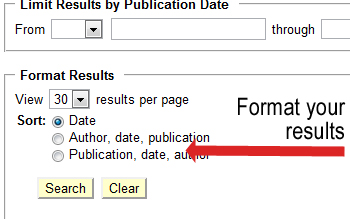
Limit Results by Publication Date
This section of the search screen allows you to limit your search by the search item's month and year of publication.
Format Results
Here you have the opportunity to control the way your search results are displayed.
View from 10 to 50 results on the headlines page
Select the sort order that works best for you
Default values on the search screen:
- Search fields: The "Specify MSC, Title word(s), Author(s)/Editor(s)" section of the search screen is initially set to values derived from analysis of user search trends over the past two years. These values can be set to any of 9 different search fields.
- Selected publications: The default is a search across all eContent.
- Users can accept this value or select from the other options in this section. This region includes the ability to search on a specific publication.
- Search results format: The search results format provides bibliographic information that allows users to more fully view article or volume information before moving to the abstract or article.
- See http://www.ams.org/journals/searchResultsFormats.html for more detail.
- Results per page: Results will be returned in sets of 30 or fewer titles per screen.
- Users have the ability to change the results set to display from 10 through 50 results.
- Navigation of search results: To move to the next screen of results, use the
navigation icons at the top and bottom of the page:


- Enter search criteria in the appropriate blank box beside the field name.
- The wildcard character is the asterisk (*).
- Adjacency of search criteria is assumed within a field only when text is included within quotations. For instance, "Vector Bundles" will return the term vector bundles while Vector Bundles (sans quotes) will broaden the search to provide Vector OR Bundles.
- Boolean search operators (Or, And, Not) can be changed between fields with the pull down menus.
- eContent searching is not case-sensitive.
There are four Field Name boxes on the search screen and a total of 9 fields that can be searched. The Anywhere field can be used to conduct a search of all fields simultaneously. Search will retrieve whatever field is displayed in the Field Name box when the search is executed. The Field Name boxes can be changed to one of the fields not displayed by holding down the mouse and selecting a field from the pull down menu.
List of Available Search Fields (bold field name indicates default field):
Field Name
What it searches
Author/Editor
Author or Editor of article or volume, Author of a book review, Author or Editor of a book being reviewed in a journal
Article/Volume Title
Title of article or volume
MSC
Primary or secondary Mathematics Subject Classification
MSC year
MSC version used to classify the document
Keyword
Keywords provided by the document's author
Abstract Text
Any text in the body of the abstract
Document Text
Any text in the body of the document, excluding the abstract and references
References
Any text that appears in the document's bibliography
Anywhere
Any field listed in this set of variables
See AMS eContent Field Help for assistance with valid entries.
To change a field name:
- Move the cursor to the field name box. Click and hold the mouse button. Scroll to the desired field name and release.
- More than one field name box can be set to the same field name.
Boolean operators used in eContents Search are:
- AND
- OR
- NOT
Used within a field box: Adjacency of search criteria is assumed within a field only when text is included within quotations. For instance, "Vector Bundles" will return the term vector bundles while Vector Bundles (sans quotes) will broaden the search to provide Vector OR Bundles; entering Boolean search operators (Or, And, Not) within a single input field has no effect.
Used between field boxes: From the pull down menus between field boxes, select the appropriate operator.
Examples: 1) Two field boxes can be set to Author/Editor with the Boolean search operator between them set to and (the default) from the pull down menu.
2) Another example is a search in a journal article's title field and abstract text field for the same term:Title: "number theory"
OR
Abstract Text: "number theory"
This search will retrieve items with the phrase "number theory" in either the title OR the abstract text of the citation.
Searching for Mathematics (TeX)
The eContent search criteria may include TeX coding for accented characters. TeX coding should be included in names and mathematical symbols where appropriate.
eContent searches are set by default to display 30 titles per page in reverse chronological publication date. The next (or previous) set of 30 titles can be displayed using the navigation icons (see the Default values section of this document).
- The number of titles displayed at one time can be reset by the user. This is done from the AMS eContent Search screen using the "results per page" option. To change the setting, use the drop down menu and choose the desired number.
Options include:
- 10 titles per page
- 20 titles per page
- 30 titles per page — default
- 40 titles per page
- 50 titles per page
- Options can be set for each search.
The maximum number of results returned for any search is 50The current Sort setting is indicated by a dark circle. The setting may be changed by clicking on another option in the sort list.
Returning to AMS eContent Search
To return to the eContent Search screen and retain the criteria entered, use the browser's Back button. The Back button will page back one screen at a time.